One department subscription gives your roster Full Access, structured report self-review, consistent tool access, and training reinforcement, without a hardware contract or IT approval process.
Individual officer? Get Full Access on your own →
Every result is advisory. The officer reviews, verifies, and approves before anything can be copied. Report Shield does not decide, certify, or file anything on its own.
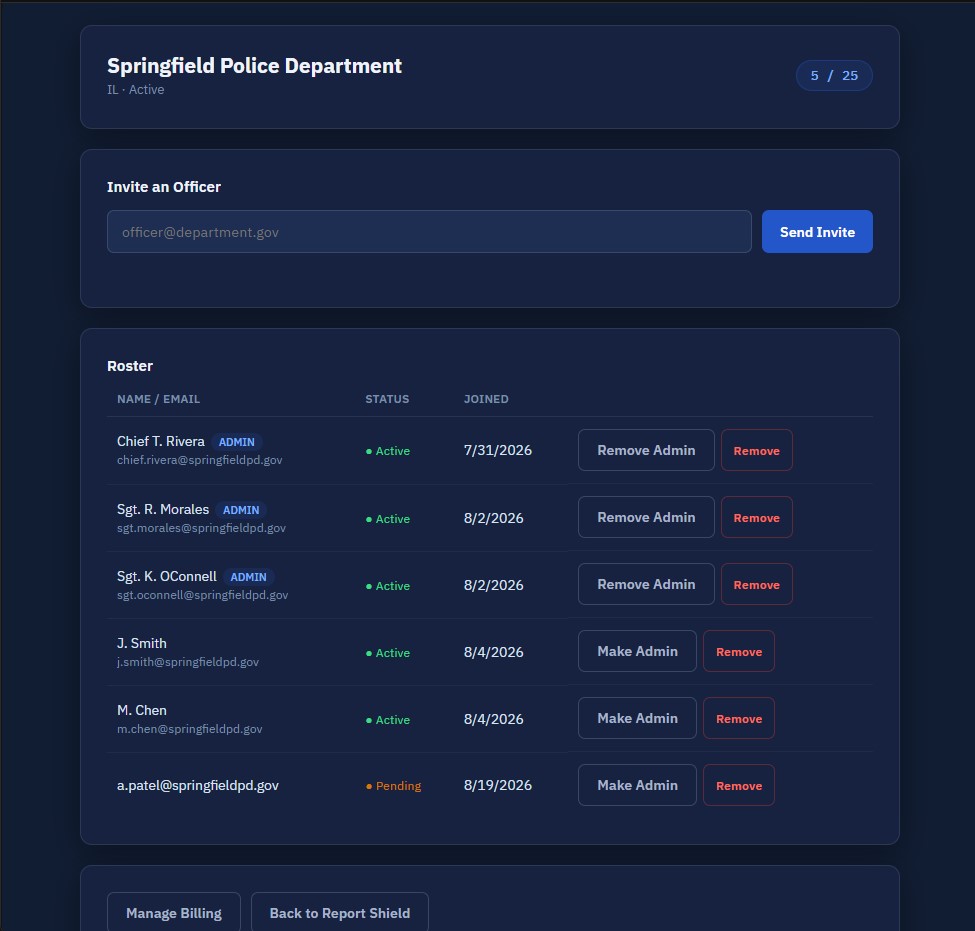
A department administrator invites, views, and removes roster members from a dedicated dashboard. More than one administrator can be designated.
Mandatory MFA, no prohibited-data inputs, and advisory-only output for every officer on the roster. Full detail on the Security page.
Officers run their own narrative through a structured review before submission, objectivity, PC strength, defense vulnerabilities, and more.
Their own report review workspace and the reference tools, scoped to their registered state.
Statute sets, court-record access, and training/certification resources are matched to the officer's registered state.
Every officer on the roster follows the same sequence: write the narrative, run the review, review the results, then approve a rewrite before it can be copied. See the full workflow →
Report Shield is advisory. It is not an RMS, a legal opinion, a prosecutor, a supervisor replacement, or a policy engine.
Actual product screen, fictional department and roster. The dashboard shows only your agency, not a company-wide administrator panel.
Multi-factor authentication is mandatory for every account. Payment cards are processed by Stripe, not stored by Report Shield. Server-side controls, prohibited-input rules, and advisory-only output apply to every officer on the roster. A model policy is available on request.
Content varies by state, statutes, court-record systems, and training resources, while the product workflow stays consistent. Other states route to our contact process.
Confirm state availability.
Review product and security materials.
Discuss seat requirements and agency questions with us.
Review the model policy and your local requirements.
Complete the department purchase and onboarding path.
Full Access: complete report analysis, all 12 incident modes, and every officer tool, plus the mobile app.
A department administrator invites, views, and removes roster members from the dashboard.
Yes, more than one administrator can be designated.
New invitations are blocked until seats are corrected or expanded.
Members are suspended; the roster itself is not deleted.
No. It does not store or file official reports.
NCIC, LEADS, MULES, other database results, criminal history, rap sheets, prior-arrest data, and biometrics.
Yes, available on request during evaluation.
Illinois and Missouri.
Use the form below, we'll follow up with seat-band pricing for your roster size.
We collect only what's needed to follow up: your name, role, agency, state, work email, seat estimate, and message. Never enter report narratives, criminal-history data, passwords, or payment details in this form. See our Privacy Policy.